Blog
A Quick Look at What’s New in EditShare 2026.3.0

A Quick Look at What's New in 2026.3.0
EditShare have announced that EditShare 2026.3.0 is now available, bringing new capabilities across FLOW AI, EditShare One and FLOW Automation, alongside updates to EFS, Ark and FLOW Scan. This release expands FLOW AI language support and makes it easier to work with AI-generated media analysis, while introducing improvements to search, metadata handling, downloads, transcript workflows, archive restore and automated ingest
A Quick Look at What's New in 2026.3.0:
- More flexibility with FLOW AI: FLOW AI now supports 13 languages, with improved transcript language controls, entity management and new ways to work with Media Highlights, Scenes, People and Logos.
- Faster everyday workflows in EditShare One: Improved advanced search, metadata export, single-asset downloads, marker controls, transcript search, sorting and asset organization.
- Expanded automation and archive workflows: Export transcripts in multiple formats, restore only the required portions of archived media and retrieve archive tape barcode information automatically.
- EFS, Ark and ingest updates: New EFS Object Storage key management, Ark improvements and expanded FLOW Scan support for CSV, ALE and JSON sidecar metadata.
Dig into the details below:
FLOW AI: More Ways to Find and Work with Content
- 13 supported languages: Scenes, Transcripts and Media Highlights can now be indexed and searched in English, Catalan, Croatian, Czech, Danish, Dutch, French, German, Greek, Italian, Portuguese, Spanish and Turkish.
- Transcript language selector: Users can switch between available transcript languages for an asset, with the original detected language clearly identified as Native.
- Multi-select AI results: Multiple Media Highlights, Scenes and Entities can now be selected and dragged directly into Projects, Bins or Sequences.
- Improved entity display: People and logos can be colour coded on the media player timeline, with bounding boxes also available in full-screen mode.
- Better entity management: Administrators can identify unknown people and logos, merge them with existing known entities, and rename known entities from System Administration.
The Result: Teams have more control over how AI analysis is searched and used when finding content and building edits.
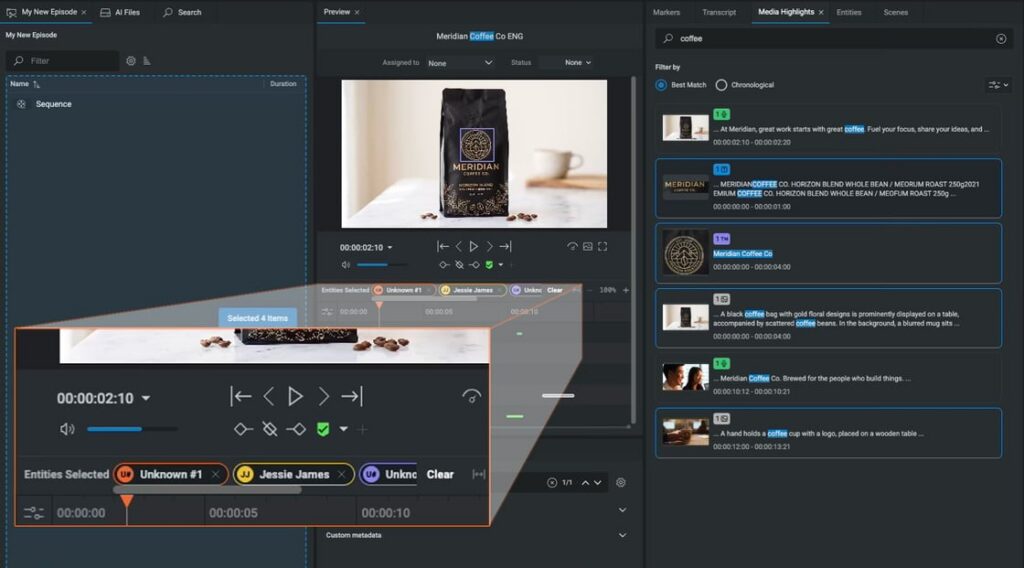 Colour coded entity display
EditShare One: Search, Metadata and Editorial Improvements
- Advanced search with text queries: Users can combine a global text query with advanced filter rules across standard and custom FLOW metadata.
- Export metadata to CSV: Metadata can be exported directly from Search Results, with options to export selected or all items and visible or all fields.
- Download individual assets: Clips, images, audio and files can now be downloaded directly from the right-click menu, using either the original file or an available proxy.
- Improved marker workflows: Marker columns can be shown, hidden and reordered, including custom metadata, and a new thumbnail column provides a visual reference. Multiple markers can also be dragged into Projects, Bins and Sequences.
- Transcript search: Users can search transcripts for specific phrases, with matches highlighted and previous and next navigation controls.
- More flexible asset organization: Assets and bins can be renamed from the right-click menu, new folders can be created during upload, and asset lists and grids can be sorted by any column.
The Result: Everyday search, organization and metadata tasks are easier to manage directly within EditShare One.
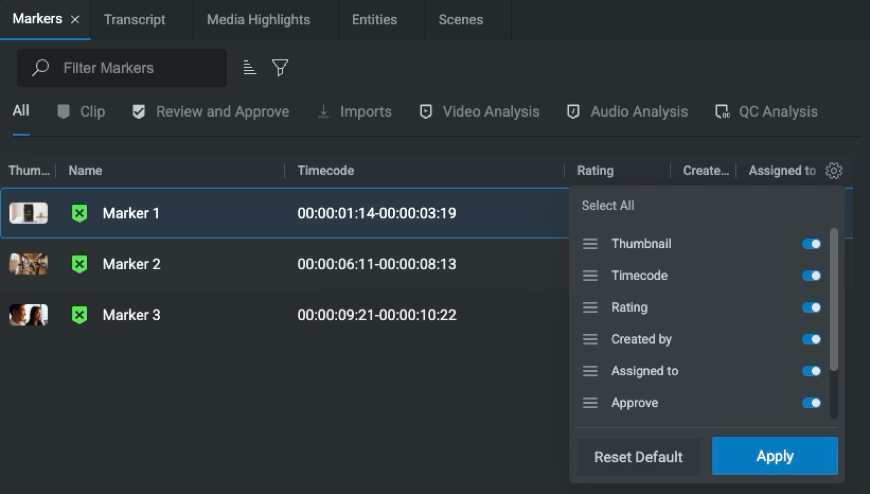 Customizable markers
FLOW Automation: Transcript Export and
Smarter Archive Workflows
- Transcript Export: Transcripts from clips or subclips can be exported in Avid Subtitle, CSV, HTML, FLOW JSON, SRT, VTT and XML formats, with controls including frame rate, language and speaker names.
- Partial archive restore: Editors and archivists can mark In and Out points on a proxy or assemble a sequence, then restore only the required portions of archived high-resolution media using a FLOW Automation template.
- Tape barcode retrieval: FLOW Automation can retrieve the tape barcode from supported Telestream DIVA and Spectra Rio MediaEngine archive systems and write it to a custom metadata field.
- Project Clip Entry triggers: External automation triggers can now use Project Clip Entries created from markers or Media Highlights, including the clip name and In/Out timecode range.
The Result: Teams can automate more of the work around transcripts, archive restoration and downstream media processing.
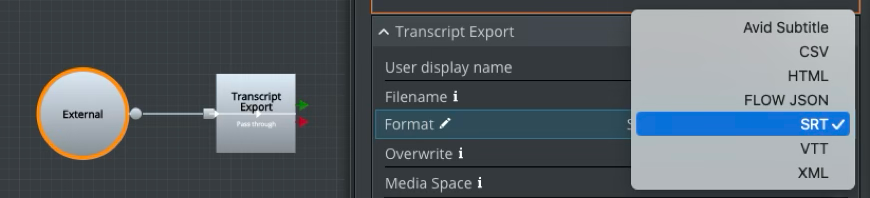 Transcript export
FLOW Scan, EFS and Ark Updates
- CSV and ALE sidecar import: FLOW Scan can import CSV and Avid Log Exchange sidecar files as asset markers during media scans.
- JSON metadata import: Matching JSON sidecar files can automatically apply clip metadata, custom fields and marker tracks during scanning.
- EFS Object Storage: EFS Media Spaces can now be accessed by S3-compatible applications using the S3 protocol, alongside existing EFS and SMB access, with Object Storage key management available in EFS Control.
- Ark improvements: Tape pools can now be renamed, and Ark service discovery has moved to Consul for improved reliability and resilience
The Result: Teams can bring richer metadata into FLOW automatically, while simplifying storage and archive administration and improving Ark service resilience.
Availability
EditShare 2026.3.0 is now available.
Please review the release notes and downloads below, and speak to us if you would like to discuss FLOW AI licensing, GPU hardware requirements, or upgrade planning.
Contact us today on 01932 255666
Connect with us on LinkedIn